Installing the Hub Battery Pack
 With the power plug at the twelve-o-clock position, remove the "lock" screw at the six-o-clock position, and the screw at the eight-o-clock position.
 Loosen the "hinge" screws at the ten and two-o-clock positions until you can unfold the battery pack.
If you have 20" wheels, you may need to remove the "hinge" screws to install the battery pack.
 Insert the battery pack through the largest opening in the spokes. You may have to bend it back and forth to get it inside the wheel.
Wrap the battery pack around the hub. Tuck the wires into the openings between the parts so they do not get pinched.
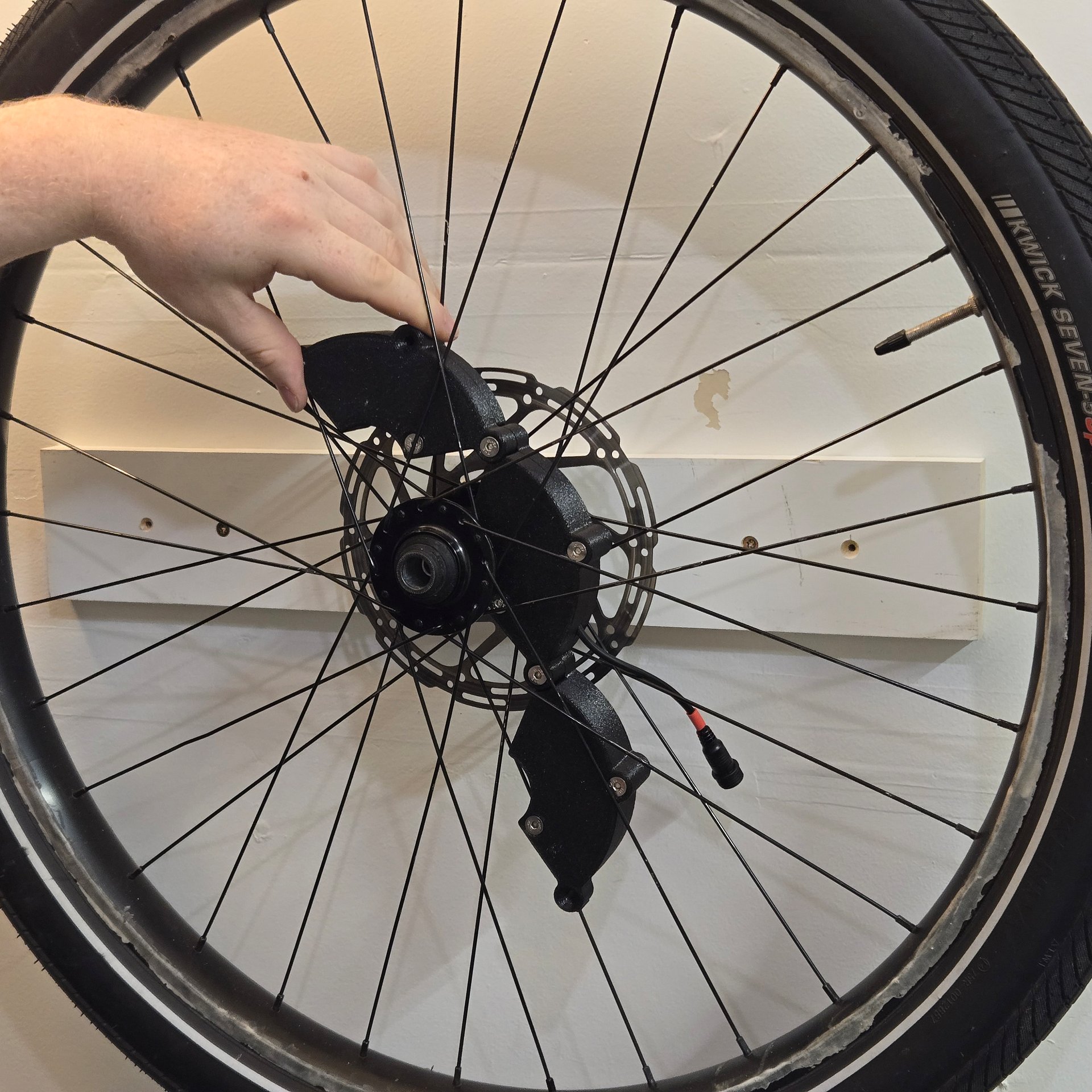 The battery pack should have a snug fit and slightly compress the closed cell foam.
If you cannot close the battery pack around the hub with just your fingers, trim the foam back until you can.
 Position the LED controller case over the two empty holes.
Use the screws you removed to attach the controller to the battery pack.
 Use the screws you removed to lock the battery pack in place.
Re-tighten the "hinge" screws.
Spin the wheel, then hit the brakes. The battery pack should not move. If it does, add more closed cell foam between it and the hub.
With the power plug at the twelve-o-clock position, remove the "lock" screw at the six-o-clock position, and the screw at the eight-o-clock position.
Loosen the "hinge" screws at the ten and two-o-clock positions until you can unfold the battery pack.
If you have 20" wheels, you may need to remove the "hinge" screws to install the battery pack.
If you have 20" wheels, you may need to remove the "hinge" screws to install the battery pack.
Insert the battery pack through the largest opening in the spokes. You may have to bend it back and forth to get it inside the wheel.
Wrap the battery pack around the hub. Tuck the wires into the openings between the parts so they do not get pinched.
Wrap the battery pack around the hub. Tuck the wires into the openings between the parts so they do not get pinched.
The battery pack should have a snug fit and slightly compress the closed cell foam.
If you cannot close the battery pack around the hub with just your fingers, trim the foam back until you can.
If you cannot close the battery pack around the hub with just your fingers, trim the foam back until you can.
Position the LED controller case over the two empty holes.
Use the screws you removed to attach the controller to the battery pack.
Use the screws you removed to attach the controller to the battery pack.
Use the screws you removed to lock the battery pack in place.
Re-tighten the "hinge" screws.
Spin the wheel, then hit the brakes. The battery pack should not move. If it does, add more closed cell foam between it and the hub.
Re-tighten the "hinge" screws.
Spin the wheel, then hit the brakes. The battery pack should not move. If it does, add more closed cell foam between it and the hub.
Installing the Wheel Lights
 Offer up the light to the wheel, as close to the rim as possible, so that two spokes cross a screw hole with another screw on either side.
 Use screws to attach two spoke disks to the light with the slot face down over the screw holes the spokes crossed.
Do not fully tighten the screws.
 Offer up the light to the wheel again and attach the spoke disks to the spoke; they should click into the slot with light pressure.
 Use screws to securely attach the light to the spokes.
 Repeat the steps to install the second light on the opposite side of the wheel.
Offer up the light to the wheel, as close to the rim as possible, so that two spokes cross a screw hole with another screw on either side.
Use screws to attach two spoke disks to the light with the slot face down over the screw holes the spokes crossed.
Do not fully tighten the screws.
Do not fully tighten the screws.
Offer up the light to the wheel again and attach the spoke disks to the spoke; they should click into the slot with light pressure.
Use screws to securely attach the light to the spokes.
Repeat the steps to install the second light on the opposite side of the wheel.
Connecting the Wheel Lights
 Plug the LED controller in to the battery pack.
Both ends of the plug have a red stripe.
 Plug in the LEDs to the LED controller.
 Use the remote to turn on the lights.
If the lights do not turn on, refer to the troubleshooting section below.
Plug the LED controller in to the battery pack.
Both ends of the plug have a red stripe.
Both ends of the plug have a red stripe.
Plug in the LEDs to the LED controller.
Use the remote to turn on the lights.
If the lights do not turn on, refer to the troubleshooting section below.
If the lights do not turn on, refer to the troubleshooting section below.
Charging the Battery Pack
- Unplug the battery pack from the LED controller.
- Plug the battery pack into the charger; the light will turn red.
- When the light turns green, the battery pack is fully charged.
- Unplug the battery pack from the charger.
- Plug the battery pack into the LED controller.
- The LED controller has a small draw and will slowly drain the battery if left plugged in.
- I recommend unplugging the battery if you are not going to be riding for more than a week.
Troubleshooting
- If the lights do not turn on when connected to the battery, plug it in to the charger. The light on the charger should turn red. This indicates that the battery circuit is active.
- If the charger does not turn red when connected the battery, use a multi-meter to read the voltage between pairs of positive/negative battery clips.
- If you identify a break in the circuit, remove all of the li-ion cells and repair the affected solder joint(s).
- Use a multi-meter to read the voltage of each cell individually. If any cell reads below 2V, it is faulty.
- Replace all three cells - do not mix new and old cells!
- If all voltages between pairs of positive/negative battery clips are nominal, unplug the battery case from the AC/DC wall adapter and carefully measure the voltage on the female DC plug.
- If it reads 0V, the BMS is in standby mode. Remove all of the li-ion cells, plug it in to the AC/DC wall adapter, and use a piece of wire to short the P+/B+ terminals. This will reset the BMS. Unplug it from the AC/DC wall adapter, re-install the li-ion batteries, and repeat the first step.